The interface
Every tab of the interface, from the overview to the specialised tables, and the keyboard shortcuts.
Layout
The sidebar is grouped in two sections. Steering holds the pages you work from: Overview, Issues, Action plan, Fix in 1 click. Explore holds the tables: internal pages, links and linking, content, images, indexability, with every other tab under More analyses; History and Settings sit at the bottom. On tablets and phones the sidebar becomes a drawer.
The topbar shows the domain, the crawl status (running, partial, complete), an export menu (report, JSON), the open and scheduled crawls, and a Run the crawl again button. The language switcher and the theme button (dark by default, light available) are in the header.
Click a row in any table to open the detail pane: tabs for the page's data, inlinks and outlinks (paginated by 200, with the real total), a Google SERP preview with pixel widths, and the page's issues with how to fix them. The pane is resizable. Keyboard: ↑ ↓ to move, Enter to open, / to search.
The tabs
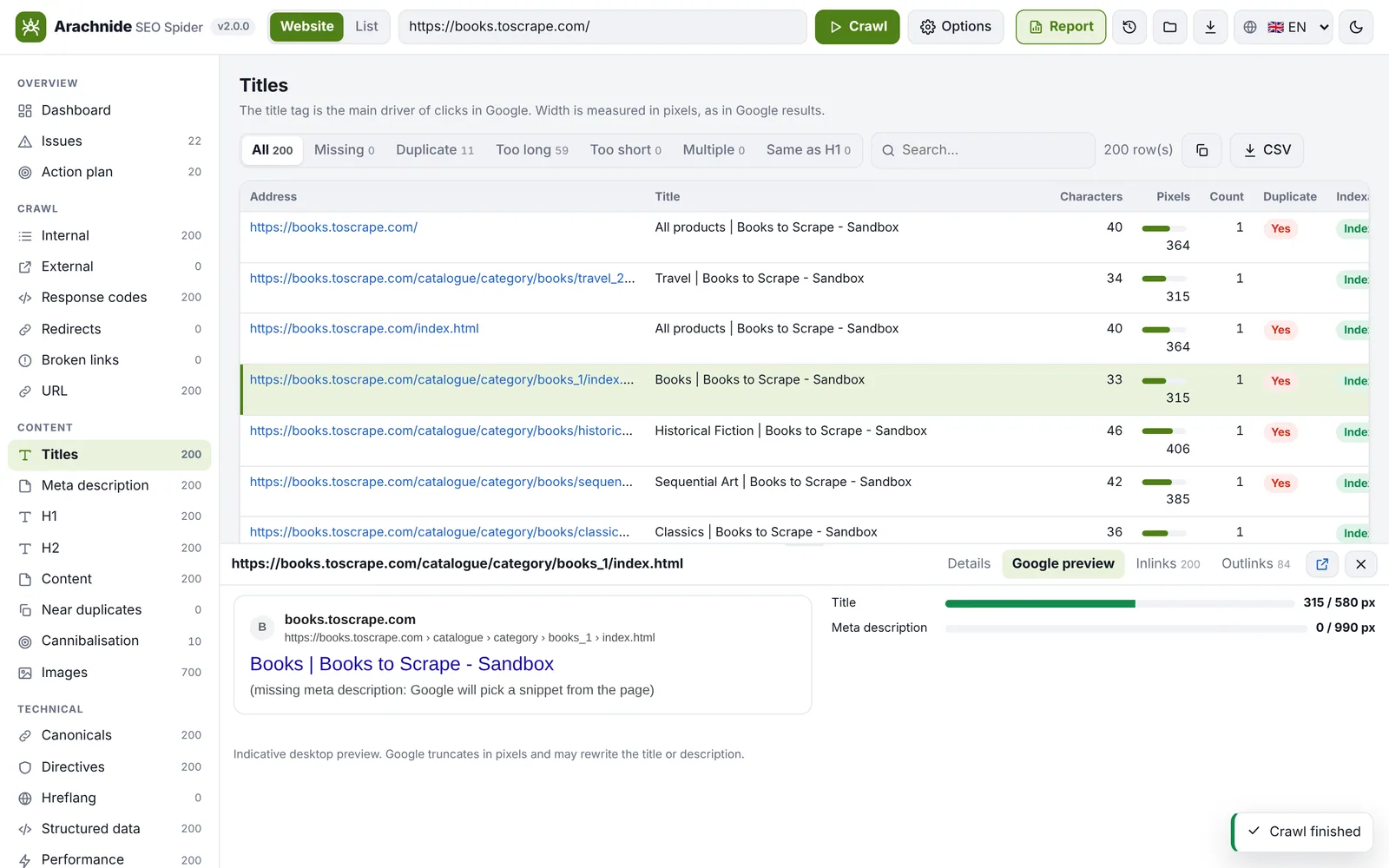
Version 3.21.0 has 37 tabs; the main ones:
| Tab | What it shows |
|---|---|
| Overview | Health score, pillars, priorities, key indicators, segments table |
| Issues | Every check that failed, by severity, with the fix panel |
| Action plan | Issues turned into ordered actions with status and notes |
| Fix in 1 click, Fix history | AI and automatic corrections, review, apply, undo |
| Internal, Internal (live), External | Internal links (grouped by page and target, with all their anchors), live link checks, external links |
| Response codes, Redirects, Broken links | Status by URL, redirect chains and loops, broken internal and external links with their source pages |
| URL | Uppercase letters, underscores, parameters, accents, length |
| Titles, Meta description, H1, H2 | Missing, duplicate, too long in pixels, too short, multiple; title identical to H1; SERP preview |
| Content, Near duplicates, Cannibalisation | Word count, thin content, main keyword, exact and near duplicates (simhash), pages competing on the same keywords |
| Images | Alt text, weight, broken images, width/height, every srcset and <picture> file, WebP / AVIF |
| Extraction, Search | Values collected by your custom extractors; pages containing a text or a regex |
| Canonicals, Directives, Hreflang | Canonical tags, meta robots and X-Robots-Tag, hreflang codes, return links, x-default |
| Structured data | JSON-LD and microdata types, invalid JSON-LD, properties missing for rich results |
| JavaScript | Differences between raw and rendered HTML, JS errors, LCP and CLS (rendering mode) |
| Performance, Core Web Vitals, Security | Response time, HTML size, compression; PageSpeed and CrUX field data; HTTPS, HSTS, mixed content |
| Search Console, Google Analytics | Clicks, impressions, CTR, position; sessions, views, users per URL |
| Internal linking, Sitemap, Robots, AI & sitemaps | Link Score and inlinks; sitemap coverage; robots.txt rules, AI crawlers, llms.txt |
| Site map, 2D / 3D visualisation | The crawl tree, directories and link graph |
Every table can be sorted, filtered and exported as CSV. Each tab's count is computed once per crawl.
Internal linking and Link Score
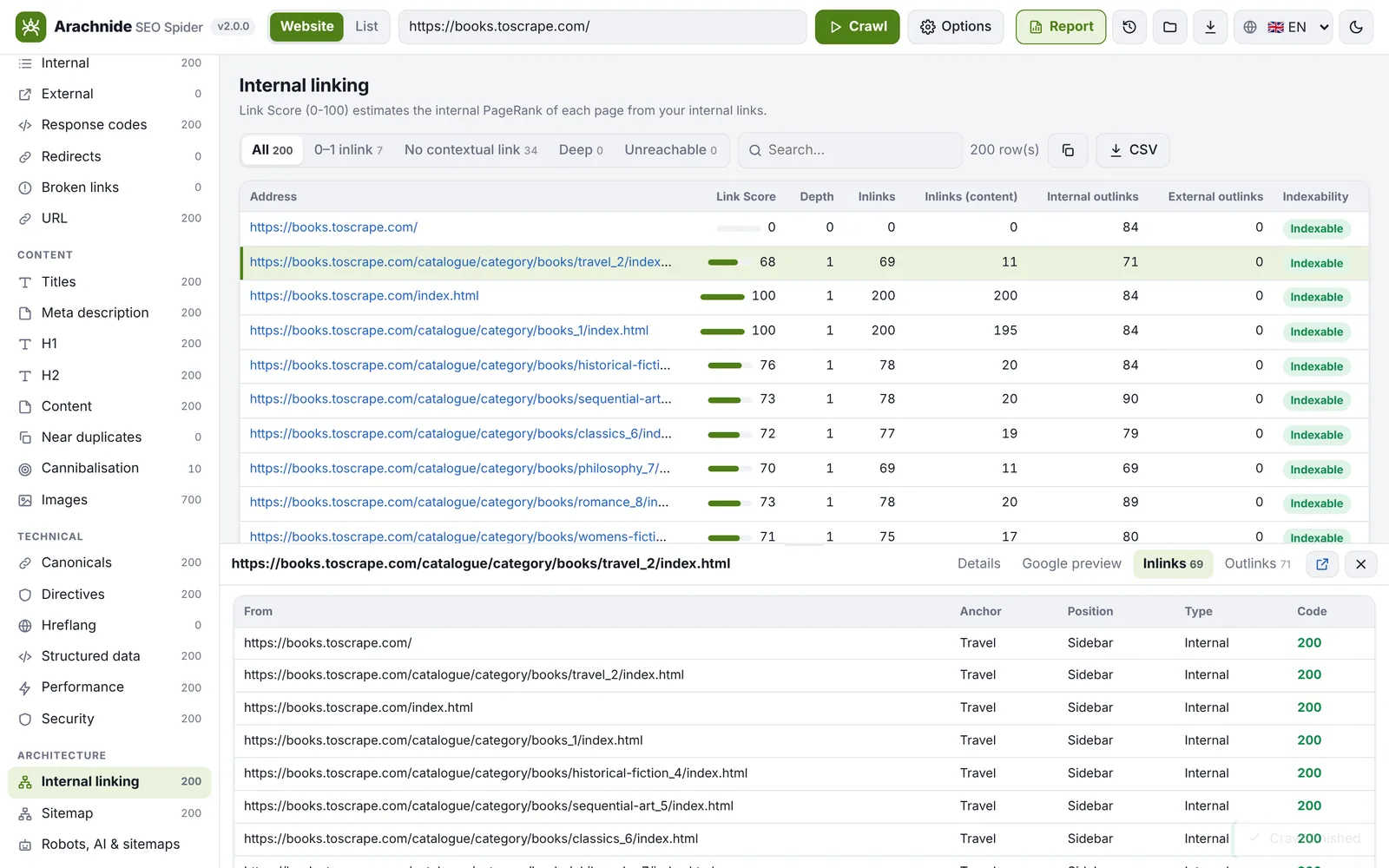
Link Score is Arachnide's internal PageRank, computed on the followed internal links of the crawl: a relative measure of how well a page is linked inside the site, not a Google metric. The tab lists, for every page, its unique inlinks, contextual inlinks (links from the content rather than menus and footers), outlinks and click depth, and flags pages with a single inlink, no contextual link, or no inbound link observed in the crawl.
Settings
Settings (the gear icon) opens the crawl configuration, described in Crawl configuration, plus the AI pane (provider, key and model for Fix in 1 click), the Google pane (PageSpeed, Search Console, Analytics) and the AI agents pane (token, URLs, log).