Fix in 1 click
AI providers, each CMS connector and its prerequisites, and the safety model - human approval, journal, undo.
How it works
Since 3.5, after a crawl, the Fix in 1 click tab groups issues by impact (pages × severity) and tags each one AI-fixable, Automatic or Manual. Every correction follows the same path, and the AI never touches your site by itself:
issue → proposal → before / after review → human approval → connector applies → re-crawl of the URL → history (undo)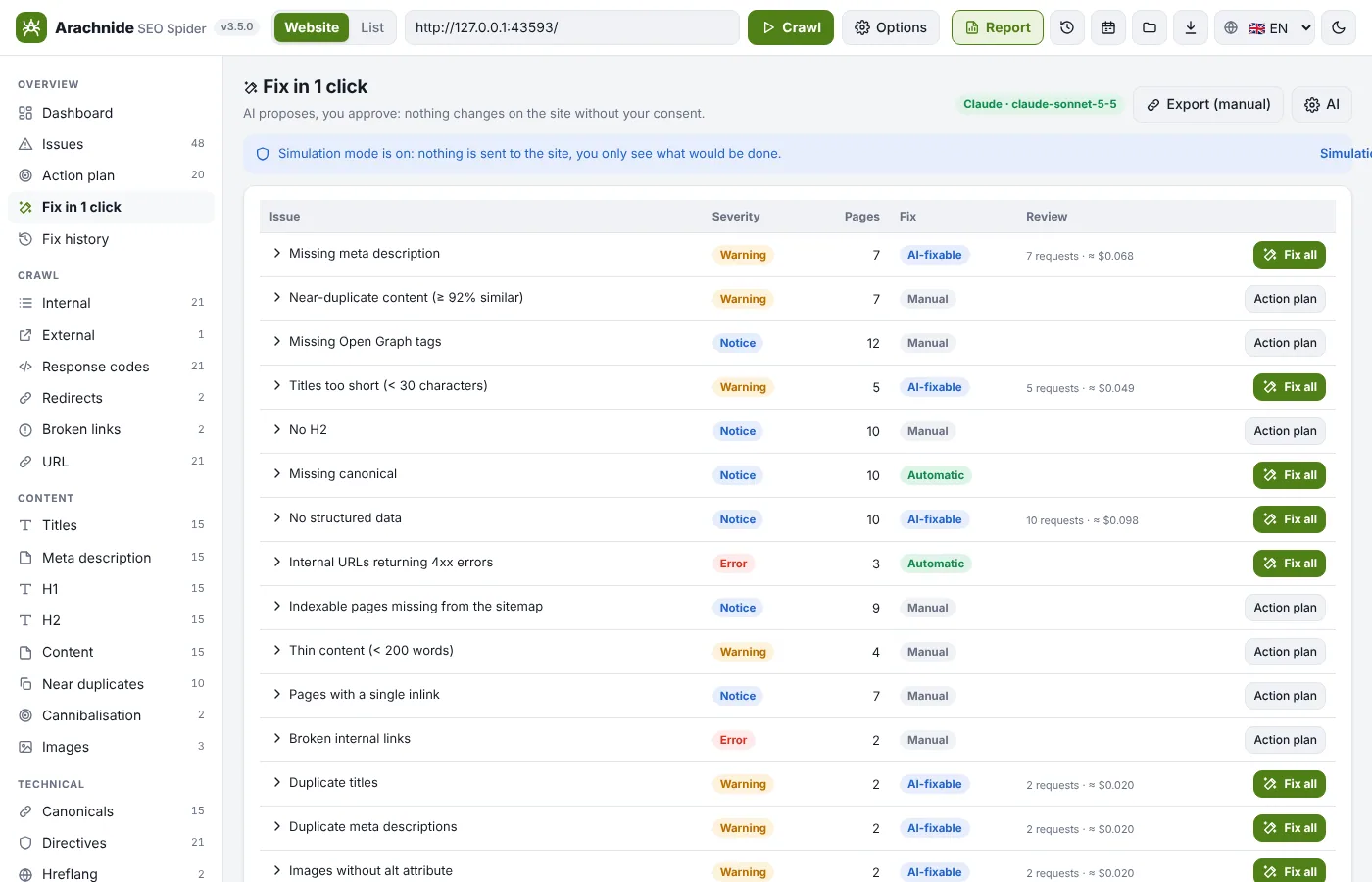
- Fix one URL or Fix all for an issue type. Claude or ChatGPT writes SEO titles, meta descriptions, H1, image alt texts and JSON-LD (Article, Organization, FAQPage, Product depending on the page) in the page's language, from a minimal context: URL, language, title, H1, an excerpt of about 2 000 tokens, target lengths and the values of other pages to avoid duplicates. The estimated cost is shown first; batches run 3 requests at a time with back-off on 429.
- Automatic fixes without AI: a 301 redirect from an internal 404 to the closest existing URL (the parent folder is searched first), a missing or inconsistent canonical, an accidental noindex, links pointing to redirects replaced by the final URL.
- Non-automatable issues (performance, hosting, Core Web Vitals…) get a written action plan, never an Apply button.
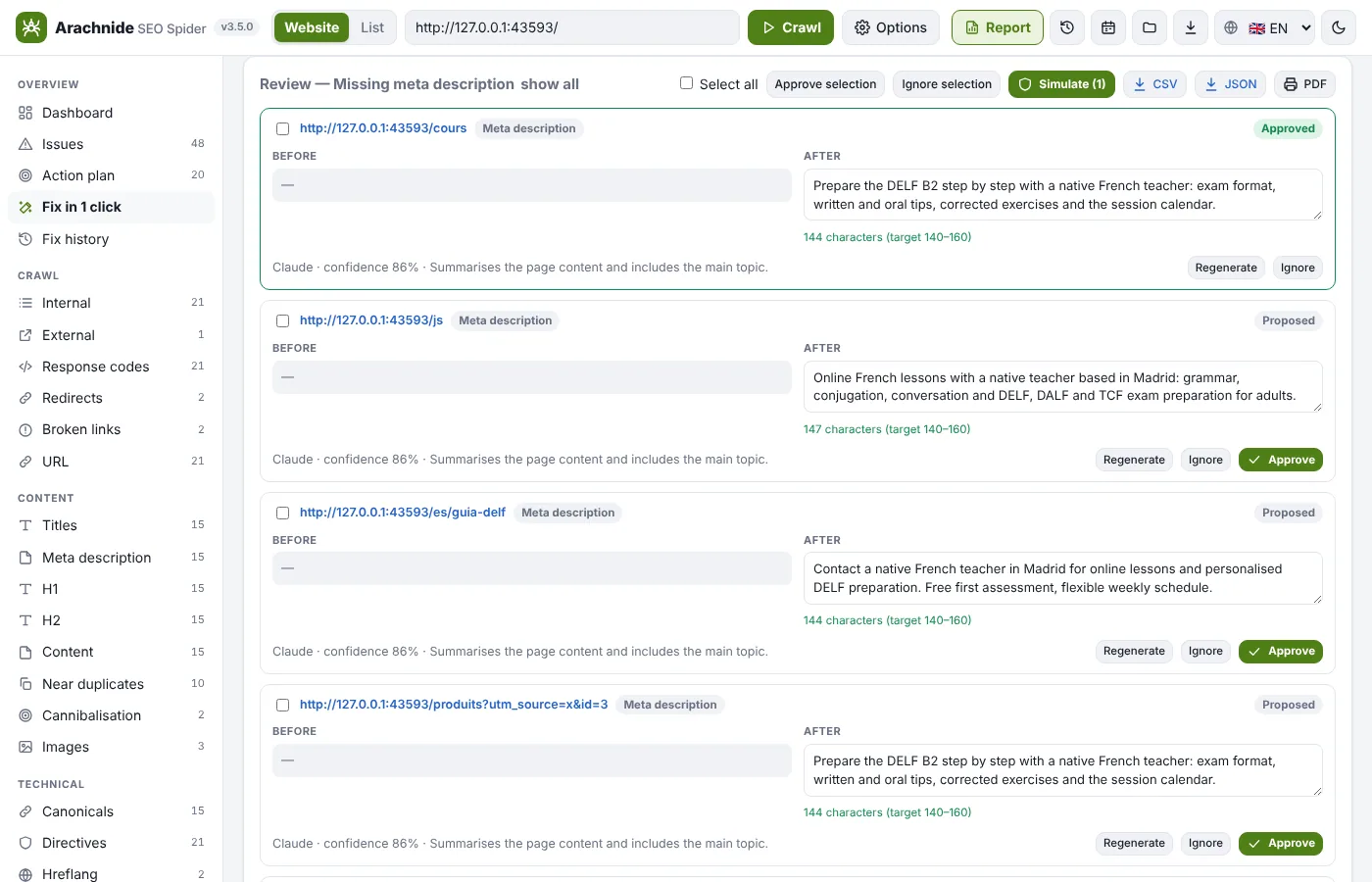
- Review: before / after side by side, character counter against the target length, inline edit, Approve / Regenerate / Ignore, multi-select.
- Apply through a connector. Simulation mode is on by default: nothing is sent until you switch it off and accept the warning.
- Each fixed URL is re-crawled and marked verified when the new value is visible on the public page (a cache or CDN may delay it; recheck later from the history). The Fix history tab undoes one fix or a whole batch and exports the Applied fixes PDF.
AI providers
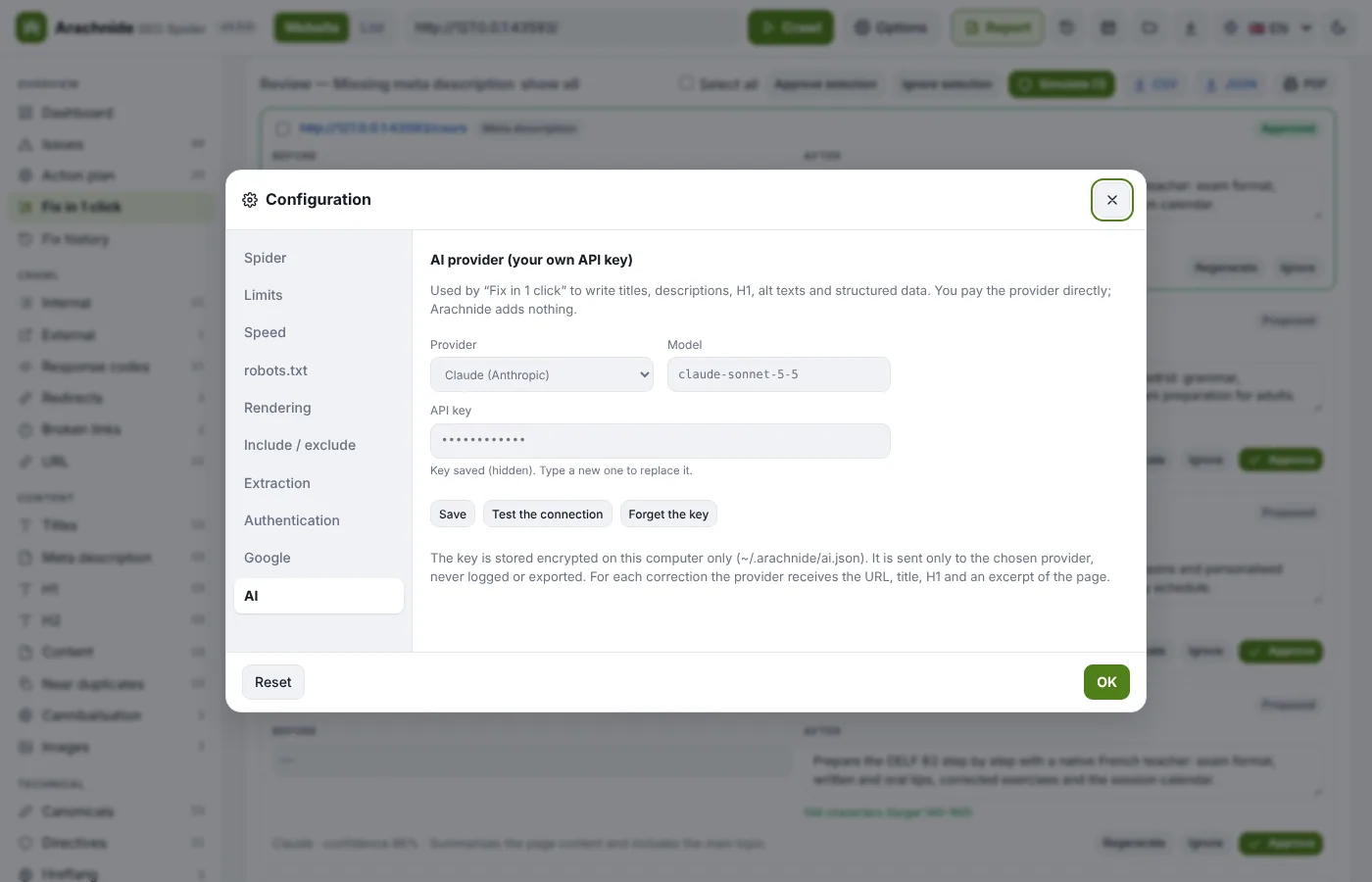
Settings → AI: choose Claude (Anthropic) or ChatGPT (OpenAI), paste your API key (from console.anthropic.com or platform.openai.com), pick a model from the editable list (defaults in src/ai/models.json), and click Test the connection. The key is stored encrypted (AES-256-GCM) on your computer, never returned to the browser, logged or exported, and sent only to that provider; you pay the provider directly. Invalid answers get one retry, then a clear failure.
Connectors
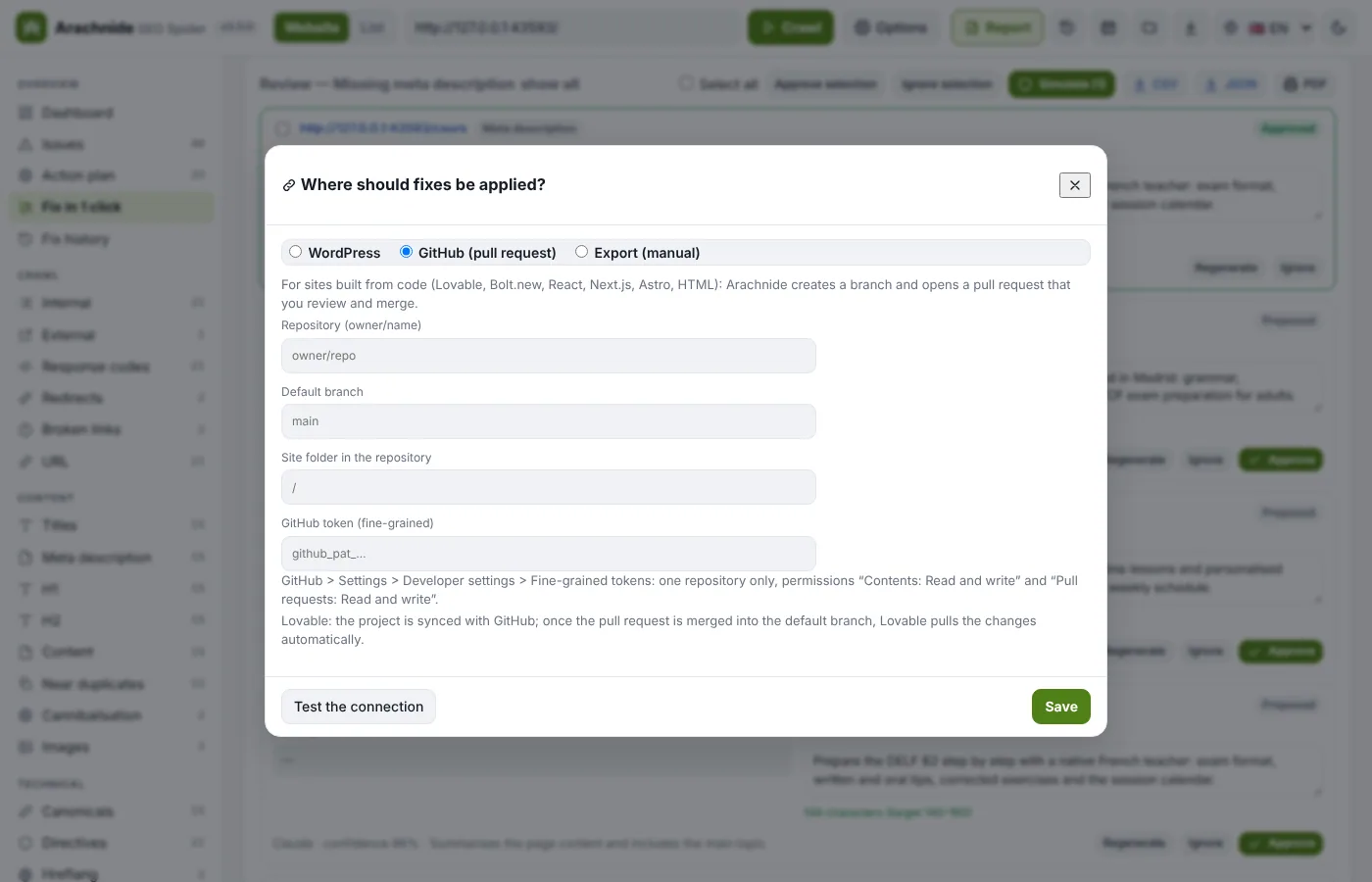
The connector is chosen per site; Arachnide detects the CMS automatically. Credentials are stored locally, encrypted, and never returned by the API, logged or exported. A connector writes only the field of the fix it was given, on the URL of the fix, and always returns the previous value so the change can be undone.
| Connector | What to do on the site | Fields applied |
|---|---|---|
| WordPress (+ WooCommerce) | In the Fix tab, click the connection button → WordPress → Download the WordPress plugin (.zip), then Plugins → Add New → Upload Plugin. Create an application password in Users → Profile → Application Passwords and enter the site address, username and that password. An Editor account is enough for content, Administrator for redirects. Works with Yoast SEO, Rank Math, SEOPress, All in One SEO and Redirection. | Title, description, H1, canonical, noindex, image alt, 301 redirects (H1 and alt work even without the plugin) |
| GitHub pull request (Lovable, Bolt.new, React, Next.js, Astro, static HTML) | Create a fine-grained token: Only select repositories (one repository), permissions Contents: Read and write and Pull requests: Read and write. Enter owner/repo and the token. Arachnide detects the framework, finds the exact location of titles, descriptions, H1, alt and links in the code (AI-assisted when ambiguous), shows the diff, then opens a pull request on arachnide/fix-YYYYMMDD-HHMM with a summary table. Undo closes the PR or opens a revert PR. For Lovable, merging it into the default branch updates the project. | Title, description, H1, alt, links |
| Shopify | Custom app with scopes read/write_products, read/write_content, read/write_online_store_navigation, read/write_files; Admin GraphQL API | Title, description, H1, noindex, product image alt, redirects |
| Wix | API key with Manage SEO Settings (+ read Blog / Stores) | Title, description, canonical, noindex, redirects |
| Webflow | Site token with pages, CMS and sites scopes; bind the CMS SEO fields in the Designer; publish after the write | Title, description, CMS item H1, redirects (Enterprise) |
| Joomla 4/5 | API token of a Super User, Web Services plugins enabled | Title, description, H1, noindex, image alt, redirects |
| Drupal 9–11 | JSON:API with write access and HTTP Basic Auth (+ Metatag, Redirect modules) | All 7 |
| PrestaShop | Advanced Parameters → Webservice → key with products / categories / cms | Title, description, H1 (name), alt in descriptions |
| Files (static sites, Next.js, Hugo…) | A folder with the HTML (Git checkout or build output); redirects in _redirects (Netlify), .htaccess (Apache), nginx or vercel.json; deploy as usual afterwards | All 7 |
| Cloudflare Worker (any site behind Cloudflare) | Deploy the Arachnide SEO Worker, which rewrites the HTML at the edge; account id, KV namespace id and API token | All 7 |
| Manual (Squarespace and other closed builders) | Nothing: the exact click path and the value to paste, per CMS | — |
| Export | CSV, JSON or a PDF with step-by-step instructions for any other CMS | — |
Shopify, Webflow and Wix are fully wired for the MCP server (Claude Desktop and Claude Code). In the Fix in 1 click interface of the current version they go through Export; the adapter that connects them to the interface is described in docs/CONNECTORS.md, which also explains how to add a CMS in five steps.
The settings of each connector as the MCP server expects them (secrets as env:VARIABLE):
| Connector | Settings (secrets as env:…) | What to do on the site |
|---|---|---|
wordpress | user, appPassword | Users → Profile → Application Passwords; install the Arachnide Connector plugin for SEO fields and redirects |
shopify | shop (xxx.myshopify.com), accessToken, apiVersion | Create a custom app with scopes read/write_products, read/write_content, read/write_online_store_navigation, read/write_files |
wix | siteId, apiKey | API key with Manage SEO Settings (+ read Blog / Stores) |
webflow | siteId, token, publish (none/items/site) | Site token with pages, CMS and sites scopes; bind CMS SEO fields in the Designer |
joomla | token | Joomla API token of a Super User (Web Services plugins enabled) |
drupal | user, password, metatagField | Enable JSON:API (with write) and HTTP Basic Auth |
prestashop | apiKey, languageId | Advanced Parameters → Webservice → key with products / categories / cms |
cloudflare | accountId, namespaceId, apiToken | Deploy the Worker |
files | root, redirectsFormat (netlify, apache, nginx, vercel) | Folder with the HTML (Git checkout, build output); deploy as usual afterwards |
manual | cms | nothing |
Coverage
| Platform | Share of all websites | How fixes are applied | Fields applied automatically |
|---|---|---|---|
| WordPress (+ WooCommerce) | 40.1% | REST API + Arachnide Connector plugin (Yoast, Rank Math, AIOSEO, SEOPress, Redirection, or none) | all 7 (H1 + alt work even without the plugin) |
| Shopify | 5.4% | Admin GraphQL API | title, description, H1, noindex, product image alt, redirects |
| Wix | 4.2% | Wix REST APIs (Item SEO Tags, URL Redirect Manager) | title, description, canonical, noindex, redirects |
| Squarespace | 2.4% | no write API → step-by-step instructions, or Cloudflare Worker | — |
| Joomla 4/5 | 1.1% | Web Services API (articles) | title, description, H1, noindex, image alt, redirects |
| Webflow | 0.8% | Data API v2 | title, description, CMS item H1, redirects (Enterprise) |
| Drupal 9-11 | 0.6% | JSON:API (+ Metatag, Redirect modules) | all 7 |
| PrestaShop | 0.5% | Webservice API | title, description, H1 (name), alt in descriptions |
| No CMS (custom, static, Next.js, Hugo…) | 31.6% | files (edit the HTML + _redirects / .htaccess / nginx / vercel.json) or Cloudflare Worker | all 7 |
| Any other site behind Cloudflare | — | Arachnide SEO Worker rewrites the HTML at the edge | all 7 |
| Everything else | — | manual: exact click path + value to paste, per CMS | — |
Content written by page builders (Elementor, Divi…), theme templates or JavaScript may not be reachable through CMS APIs: those changes come back as manual steps, or go through the Cloudflare Worker. Arachnide changes on-page SEO fields and redirects; it does not rewrite body content, change templates or touch your hosting.
Safety model
- Preview first. Nothing is written before you see the current value, the new value and the SEO warnings (pixel width, noindex…).
- Human approval of every change; simulation mode by default; an explicit warning before the first live write.
- Policy per site: allowed fields, maximum changes per batch, read-only mode.
- Journal and undo: every applied change stores its previous value (
~/.arachnide/journal/<site>.jsonlfor the MCP server; the Fix history in the app); a whole batch can be rolled back. - Verify: the public page is read again after the write.
- Only the site's own host is accepted; no change can target another domain.
- Connectors were built from the official API documentation and tested against faithful mock servers, plus the Cloudflare Worker in the real Workers runtime. Test on a staging site or a few pages first, and report issues on GitHub.